SQL Joins Explained INNER, LEFT, RIGHT, and FULL JOIN
A practical explanation of INNER, LEFT, RIGHT, and FULL JOIN using photos and users as a simple example.
SQL joins combine rows from two tables using a condition that relates the tables.
A useful way to understand joins is to stop thinking of them as just SQL syntax and instead ask one question:
Which rows do I want to keep?
The supplied cheatsheet uses two tables, photos and users, connected through photos.user_id = users.id. It demonstrates four common join types: INNER JOIN, LEFT JOIN, RIGHT JOIN, and FULL JOIN.
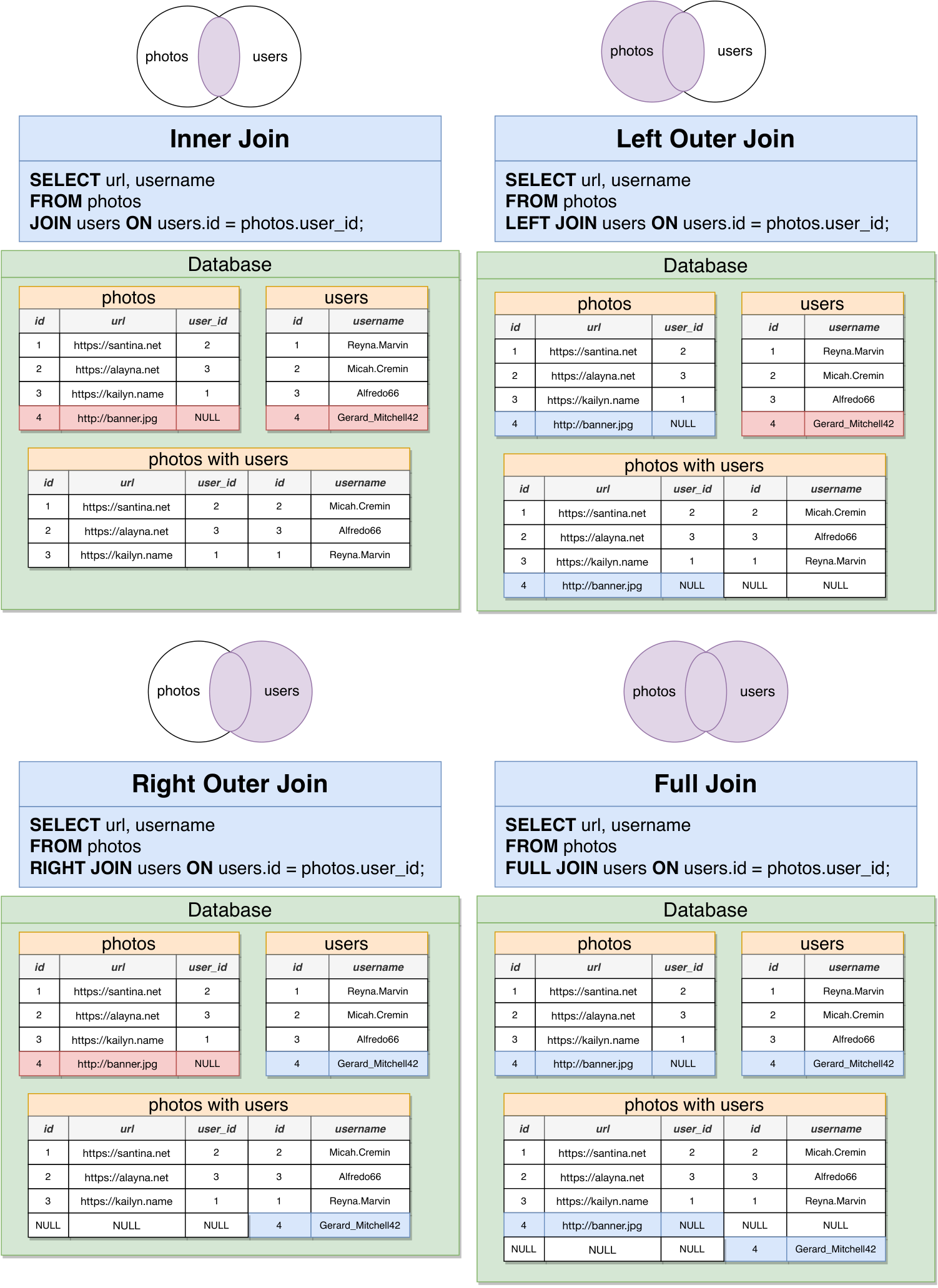 SQL joins: INNER, LEFT, RIGHT, and FULL JOIN.
The example tables
The photos table contains a user_id column:
1
2
SELECT *
FROM photos;
Conceptually:
| id | url | user_id |
|---|---|---|
| 1 | https://santina.net | 2 |
| 2 | https://alayna.net | 3 |
| 3 | https://kailyn.name | 1 |
| 4 | http://banner.jpg | NULL |
The users table contains the corresponding user IDs:
| id | username |
|---|---|
| 1 | Reyna.Marvin |
| 2 | Micah.Cremin |
| 3 | Alfredo66 |
| 4 | Gerard_Mitchell42 |
The relationship is:
1
photos.user_id  →  users.id
For example, photo 1 has user_id = 2, so it belongs to Micah.Cremin.
The
JOINcondition determines which rows match. The type of join determines which unmatched rows remain in the result.
1. INNER JOIN
An INNER JOIN returns rows where a matching row exists in both tables.
1
2
3
SELECT url, username
FROM photos
JOIN users ON users.id = photos.user_id;
The result contains the three photos that have a matching user:
| url | username |
|---|---|
| https://santina.net | Micah.Cremin |
| https://alayna.net | Alfredo66 |
| https://kailyn.name | Reyna.Marvin |
The photo with user_id = NULL is not included.
The user Gerard_Mitchell42 is also not included because there is no photo whose user_id is 4.
JOINwithout a qualifier meansINNER JOIN. It keeps only rows that satisfy the join condition.
2. LEFT JOIN
A LEFT JOIN keeps all rows from the table on the left side of the join.
1
2
3
SELECT url, username
FROM photos
LEFT JOIN users ON users.id = photos.user_id;
Now all four photos remain:
| url | username |
|---|---|
| https://santina.net | Micah.Cremin |
| https://alayna.net | Alfredo66 |
| https://kailyn.name | Reyna.Marvin |
| http://banner.jpg | NULL |
There is no user associated with banner.jpg, so the columns coming from users contain NULL.
This is one of the most important rules to remember:
1
2
FROM photos
LEFT JOIN users
means:
1
2
KEEP ALL photos
TRY TO MATCH users
With a
LEFT JOIN, the table afterFROMis the preserved table. Reversing the tables can change the result.
3. RIGHT JOIN
A RIGHT JOIN does the opposite: it keeps all rows from the table on the right side.
1
2
3
SELECT url, username
FROM photos
RIGHT JOIN users ON users.id = photos.user_id;
The three matching users are returned, but Gerard_Mitchell42 is also included:
| url | username |
|---|---|
| https://santina.net | Micah.Cremin |
| https://alayna.net | Alfredo66 |
| https://kailyn.name | Reyna.Marvin |
| NULL | Gerard_Mitchell42 |
There is no photo for user 4, so the photos columns become NULL.
Think of it as:
1
2
FROM photos
RIGHT JOIN users
means:
1
2
TRY TO MATCH photos
KEEP ALL users
RIGHT JOINis valid SQL, but many queries are easier to read if you put the table you want to preserve on the left and useLEFT JOINinstead.
For example, these two queries express the same preservation logic:
1
2
3
FROM photos
RIGHT JOIN users
    ON users.id = photos.user_id;
and:
1
2
3
FROM users
LEFT JOIN photos
    ON photos.user_id = users.id;
The important part is not memorizing RIGHT JOIN. It is understanding which table is preserved.
4. FULL JOIN
A FULL JOIN keeps unmatched rows from both tables.
1
2
3
SELECT url, username
FROM photos
FULL JOIN users ON users.id = photos.user_id;
The result contains:
- photos with matching users;
- the photo with no user;
- the user with no photo.
So both unmatched records survive:
1
2
banner.jpg              → no matching user
Gerard_Mitchell42       → no matching photo
The corresponding columns are filled with NULL.
FULL JOINis useful when you need to see everything from both sides, including records that have no match.
The easiest way to remember the four joins
Think about which rows survive:
| Join | Rows preserved |
|---|---|
INNER JOIN |
Only matching rows |
LEFT JOIN |
All rows from the left table |
RIGHT JOIN |
All rows from the right table |
FULL JOIN |
All rows from both tables |
A compact mental model:
1
2
3
4
5
INNER → matches only

LEFT  → keep left
RIGHT → keep right
FULL  → keep both
The ON condition is separate from the join type
The join condition in these examples is:
1
ON users.id = photos.user_id
This answers:
How are these two tables related?
The join type answers a different question:
What happens to rows that do not have a match?
That distinction is important.
1
2
3
FROM photos
LEFT JOIN users
    ON users.id = photos.user_id;
can be read as:
- Start with
photos. - Try to find a
usersrow whereusers.id = photos.user_id. - Keep every photo.
- If there is no matching user, use
NULLfor the user columns.
Why the order matters
Consider these two queries:
1
2
3
4
SELECT url, username
FROM photos
LEFT JOIN users
    ON users.id = photos.user_id;
and:
1
2
3
4
SELECT url, username
FROM users
LEFT JOIN photos
    ON photos.user_id = users.id;
They are both LEFT JOINs, but they preserve different tables.
The first says:
1
KEEP photos
The second says:
1
KEEP users
That is why changing the table order can change the result of a LEFT JOIN.
Do not memorize
LEFT JOINas “join these two tables.” Read it literally: keep everything from the left table, then match the right table where possible.
A practical workflow
When writing a join, identify these three things first:
- What are my two tables?
- How are they related?
- Which table’s unmatched rows must remain?
Then choose the join.
For example:
1
2
3
4
SELECT url, username
FROM photos
LEFT JOIN users
    ON users.id = photos.user_id;
Here:
- Tables:
photosandusers - Relationship:
users.id = photos.user_id - Preserved table:
photos - Join type:
LEFT JOIN
This makes the SQL much easier to reason about than trying to memorize four different diagrams.
Join cheat sheet
1
2
3
4
5
6
7
8
9
10
11
12
13
14
15
16
INNER JOIN
    Keep matches only.

LEFT JOIN
    Keep every row from the left table.
    Add matching rows from the right table.
    Use NULL when there is no match.

RIGHT JOIN
    Keep every row from the right table.
    Add matching rows from the left table.
    Use NULL when there is no match.

FULL JOIN
    Keep every row from both tables.
    Use NULL wherever a match does not exist.
The central idea is simple:
The join condition tells SQL what counts as a match. The join type tells SQL which unmatched rows to keep.